 AI Photos of You
Your next introduction
AI speaker headshots for conference bios and podcast pages.
Give organizers a portrait to use beside your name and session title. Create headshot options with a simple background, your choice of clothes, and room for the event’s crop.
Create your speaker headshotFrom $19 USD. Pay once, no subscription.
Your reference photos stay private. How your photos are handled
Get the brief, then choose your look
Check whether the organizer accepts AI portraits and confirm the file type, crop, minimum dimensions, and deadline before generating. Studio does not guarantee a particular pixel size.
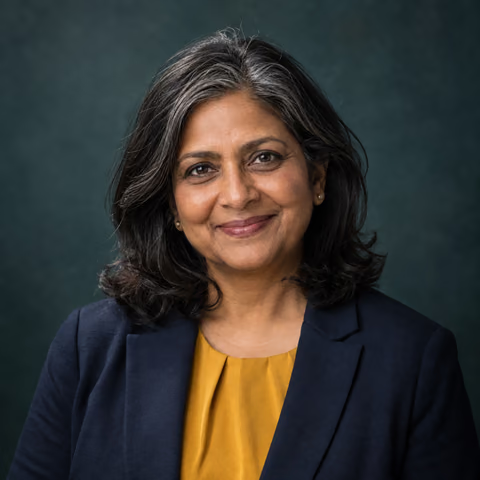
The headshots look starts with a square composition. Leave space around your head and shoulders for a circle or tighter rectangle.
Make your portrait easy to place
A plain backdrop works beside a conference bio, podcast title, or webinar introduction. Choose the clothing you plan to wear when you present, and keep attention on your face.
- A navy jacket and open-collar shirt, soft neutral background, friendly direct eye contact.
- A plain dark knit top, cream studio backdrop, relaxed shoulders, natural smile.
- Head-and-shoulders framing with room for a tighter crop; no microphones, logos, or text.
Your speaker-photo submission checklist
Keep the organizer’s requirements beside the downloaded file while you check it. A portrait that looks good on screen may still miss a submission requirement.
- Confirm whether AI portraits are accepted and how to disclose one.
- Check the actual file type, pixel dimensions, and file size against the brief; verify the downloaded file rather than relying on the preview.
- Preview the requested square, circle, or rectangular crop with hair and chin visible.
- Compare the face with your current appearance, including glasses and hairstyle.
- Use the requested filename and include your preferred name, role, short bio, and image credit or AI disclosure if requested.
- Send through the organizer’s chosen channel by its deadline and ask for confirmation if the upload does not provide one.
An example organizer brief
Hypothetical brief for planning only; these are not universal event requirements or promised Studio output specifications.
“Please send one square JPG, at least 800 × 800 pixels and under 5 MB, by the date in your invitation. Leave room for a circular crop. Name the file firstname-lastname.jpg and include your preferred name, role, and a 60-word bio. AI portraits are accepted for this example event when disclosed and representative of your current appearance.”
For a brief like this, inspect the downloaded file’s dimensions and format first. If it falls short, ask the organizer whether another size is acceptable; changing a filename or enlarging an image does not restore missing detail. Replace every example requirement with the real organizer’s instructions.
Choose one image for your event materials
Compare your results with recent photos and pick a portrait that reflects your current appearance. Preview it at thumbnail size and check the downloaded file against the organizer’s specifications.
Submit your choice through the requested channel, identifying it as AI-generated where required. Reuse it for other guest pages when their requirements allow. Use real event photos to document past speaking appearances.
Your next photo starts here
Choose a look. Make it yours.
Upload your selfies, choose a style, and describe your photo. Review the credit cost in Studio before you start.
Create your speaker headshotResults vary. Keep the photos you feel represent you.
A few things to know
Your questions, answered.
Can I submit this to any conference?
Check the organizer's requirements first. Acceptance of AI imagery, file specifications, and editorial standards vary by event; this service cannot approve a submission on the organizer's behalf.
Can you put me on a conference stage?
For a speaker bio, use a straightforward portrait. A generated stage scene is imagined and should not be presented as evidence that you spoke at an event.
Can I reuse a headshot for a podcast and a conference?
Yes, if it still represents your current appearance and each organizer accepts it. Check the requested crop and file requirements separately before submitting the same portrait.