 AI Photos of You
Profile picture guide
AI profile picture generator: create a photo that feels like you.
An AI profile picture generator uses your reference photos and instructions to create a new portrait. You can try a different setting, outfit, or lighting without booking a photoshoot. The result still needs to pass one simple test: would someone who knows you recognize you? Here’s how to choose your photos, describe the look, and decide which result is worth using.
Create your profile pictureFrom $19 USD. Pay once, no subscription.
Your reference photos stay private. How your photos are handled
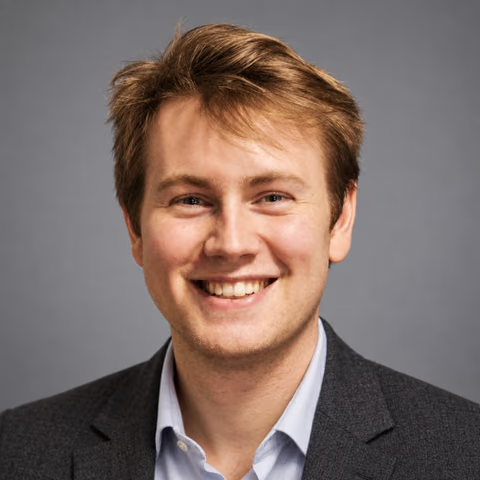
What makes a useful AI profile picture?
A useful profile picture makes your face easy to recognize at a small size. Start with a clear expression, visible eyes, and enough separation between your face and the background. A dramatic scene can work as a full portrait but become distracting inside a small profile icon.
Choose the look for the place you will use it. For a work profile, try a simple head-and-shoulders portrait with clothing you would wear to meet a colleague. For a personal account, a relaxed outdoor setting or everyday outfit may feel more like you. You do not need a suit to look approachable and prepared.
Choose an AI profile picture maker for your goal
Before choosing a tool, decide whether you want a recognizable photograph, an illustrated avatar, or a light edit of a photo you already like. Those are different goals. Look for examples that match your intended result, and check whether the tool accepts reference photos of you.
Compare the input and output when both are available. Attractive sample portraits alone do not show how closely a generator preserves someone’s appearance. Check the face shape, eyes, nose, and hairline, then ask whether the result still feels like the same person.
- Likeness: can you compare an actual reference photo with its generated result?
- Control: can you describe the setting, outfit, expression, and framing?
- Downloads: can you save a usable image, and are there watermarks or export charges?
- Privacy: who can access your uploads, and how can you delete them?
- Cost: what do generation, additional attempts, and edits each cost?
Looking for a free AI profile picture generator?
If you are searching for an AI profile picture generator free of charge, check what the offer includes before uploading. Read the details for generation limits, download access, watermarks, and whether a payment method is required. A free preview is only useful if you understand what it costs to get the image you want to use.
AI Photos of You is a paid photo studio, not a free AI profile picture generator. It uses one-time credit purchases rather than a subscription. Check the pricing below before you start; generating another version or editing a photo also uses credits.
If you only need a better crop or a less distracting composition, first try adjusting an existing photo with your phone’s built-in editor. A clear, recent photo may already do the job without generating a new portrait.
How to create your AI profile picture
Start with clear, current reference photos. Pick images where your face is sharp and unobstructed, with your usual hairstyle, glasses, and facial hair. Leave out group photos, heavy beauty filters, and images taken so close that they exaggerate your features. A simple selfie in soft window light is a practical starting point.
In AI Photos of You, open Studio, sign in, upload your reference photos, and confirm consent. Choose the headshots look and describe the portrait you want. Review the credit cost before generating. Your reference photos stay private; uploading them does not add them to our public examples.
Review the result in My photos before using it. Check your features at full size, then preview the portrait as a small square and circle. Leave some space around your head so the intended crop does not cut off your hair or chin. Download the result you approve and check the crop again in the destination app.
Three prompts to use as a starting point
Describe a few concrete choices instead of asking for a ‘perfect’ face. Include the framing, light, clothing, background, and expression. These prompts give direction; they do not guarantee likeness or an exact result.
For a professional profile: ‘Create a head-and-shoulders portrait of me in a navy shirt against a simple warm gray background. Soft window light, relaxed expression, camera at eye level. Keep my current hairstyle, facial features, and natural skin texture. Leave space around my head for a circular crop.’
For a casual social profile: ‘Create a close portrait of me outdoors with soft daylight and a simple, softly blurred leafy background. Casual clothing, a natural smile, and my everyday glasses. Keep my appearance recognizable and my face clearly visible.’
For a creative personal brand: ‘Create a head-and-shoulders portrait of me wearing a dark crewneck against a muted blue studio background. Soft directional light and a calm, friendly expression. Preserve my facial features and natural skin texture, with room around my head for cropping.’
Check likeness before choosing your favorite
Put the generated portrait beside a recent photo of yourself. Check whether it has changed your apparent age, eye shape, smile, face width, or hairline. Look closely at glasses, teeth, earrings, and visible hands for distracting details. A polished image is not automatically an accurate image.
If the result feels unfamiliar, simplify the next attempt. Use clearer references, remove conflicting appearance instructions, and try straightforward lighting and framing. For an otherwise useful portrait, an edit can request a specific change, but review the whole result again afterward. Generated edits can also change details you wanted to keep.
Choose the image that represents how you look now and works at the size people will see. You can keep different portraits for work and personal accounts while still looking like the same person in both.
Your next photo starts here
Choose a look. Make it yours.
Upload your selfies, choose a style, and describe your photo. Review the credit cost in Studio before you start.
Create your profile pictureResults vary. Keep the photos you feel represent you.
A few things to know
Your questions, answered.
What is an AI profile picture generator?
It is a tool that generates a portrait from instructions and, for a personal likeness, reference photos. You can request a setting, outfit, or expression, then review the result before using it as your profile picture.
Is AI Photos of You free?
No. AI Photos of You uses paid credits purchased in one-time packages. Generation and editing both use credits. Review the current packages and cost in Studio before creating photos.
Can I make an AI profile picture from a selfie?
Yes, a clear selfie can serve as a reference. Use a recent image with visible facial features and avoid filters that reshape your face. A reference photo helps guide the result, but you still need to check whether it looks like you.
What is the difference between an AI profile picture maker and a generator?
The terms can describe the same task. Check what the specific tool does: generating a new portrait from your references, creating an illustrated avatar, or editing an existing photo. Choose according to the result you need.
What size should my AI profile picture be?
Check the current upload requirements in the app where you plan to use it. Keep a downloaded original and preview the platform’s crop before saving. A centered face with space around the head gives you more flexibility for square and circular displays.