 AI Photos of You
AI portrait guide
How to choose an AI portraits website for photos of you
An AI portraits website lets you create a new portrait online using photos and written instructions. If you want a photo of yourself, start with a site that accepts reference photos and shows results you can compare with the original person. AI Photos of You offers that personal photo workflow: upload your references, choose a look, and review your generated portraits in My photos. Here is what to check before you upload or pay.
Create your AI portraitFrom $19 USD. Pay once, no subscription.
Your reference photos stay private. How your photos are handled
Start with the kind of portrait you actually need
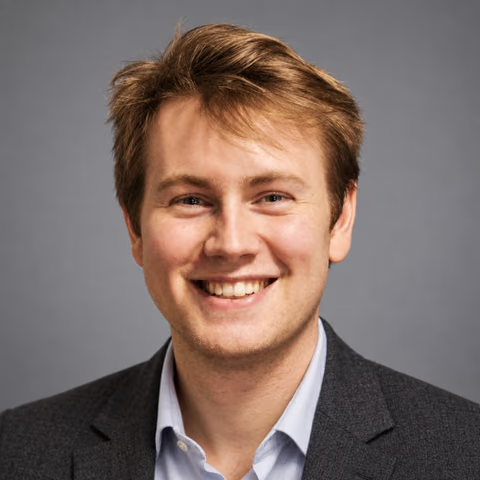
For a professional headshot, personal website, or profile picture, the first requirement is a recognizable face. Look for a reference-based photo workflow and examples with ordinary expressions, visible skin texture, and believable lighting. A beautiful sample of an invented person does not demonstrate how accurately a website can portray you.
For a painted portrait or illustrated avatar, you may care more about the artistic style. Decide which result you want before comparing tools. A website that makes striking fantasy characters may not suit a company directory, and a headshot-focused service may not offer the illustration style you have in mind.
AI Photos of You focuses on personal photos, including studio headshots, casual portraits, and imagined scenes. Start with a straightforward headshot when your main goal is a clear, recognizable introduction.
What to check before choosing an AI portraits website
Look beyond the homepage gallery. When a site provides reference-and-result pairs, compare the face shape, eyes, nose, smile, and apparent age. One good example can help you judge the intended style, but it cannot guarantee your own result.
Check the practical details before uploading. You should be able to understand what you are buying, how your photos are handled, and how to retrieve the portraits you choose.
- Likeness evidence: does the site show the original person alongside the generated portrait, with clear labels?
- Creative control: can you choose a look and describe the clothing, background, and framing?
- Full cost: what do the first generation, another attempt, and an edit each cost?
- Downloads: what file can you save, and are export access or watermarks explained?
- Photo handling: read who processes uploads, whether images become public, and how deletion works.
Free AI portrait websites and paid credits: compare the usable result
If you want a free AI portrait website, check the offer through to the download step. Look for limits on attempts, image size, watermark removal, and whether a payment method is required. A preview and a downloadable portrait are different things; make sure the offer includes what you need.
AI Photos of You uses paid credits purchased in one-time packages, with no subscription. The current packages appear below. Generating another version or editing a photo also uses credits, so review the cost in Studio before starting.
Budget for the possibility that a result will not be one you want to use. A package of generated photos is not a promise of the same number of approved portraits. If your current photo only needs a crop, try that first before paying to generate a new one.
How to create a portrait in AI Photos of You
First, choose clear, recent reference photos of yourself. Your eyes and facial features should be easy to see. Use your current hairstyle and facial hair, and avoid heavy filters, group shots, or photos with sunglasses hiding your eyes. Consistent references make your intended appearance easier to communicate.
Next, sign in to Studio, upload your references, and confirm the age and permission statement. Choose Studio headshots for a simple portrait, then describe the setting and clothing you want. Your reference photos stay private; uploading them does not add them to the public example gallery.
Review the selected shots and credit cost, then start the shoot. When results are available, open them in My photos. Compare each candidate with a recent photo of yourself before deciding which to download or edit.
A simple prompt for your first portrait
Start with a small number of concrete choices: framing, light, outfit, background, and expression. Avoid directions that conflict with your own appearance or ask for a different face.
Try: ‘Create a head-and-shoulders portrait of me wearing a plain navy shirt against a warm gray background. Use soft window light, an eye-level camera, and a relaxed expression. Keep my current hairstyle, facial features, and natural skin texture. Leave room around my head for a profile crop.’
For a more casual portrait, change the backdrop to a softly blurred outdoor setting and describe clothing you would normally wear. Treat the prompt as direction, then inspect the result: a request to preserve your features does not guarantee perfect likeness.
Choose the portrait that looks like you
Compare the face before you judge the styling. Does the portrait preserve your eye shape, nose, jaw, hairline, and smile? Has it made you look noticeably older or younger? Ask someone who knows you whether they recognize your everyday appearance.
Inspect teeth, glasses, ears, clothing edges, and visible hands at full size. Then view the image at the size it will appear on your profile or website. A portrait that looks good enlarged can lose its expression in a small circular crop.
If the face is right but the background needs work, try a focused edit and review the whole image again. If the likeness is wrong, revisit your references and simplify the instructions before another paid attempt. Use a camera photo when you need an exact record of your appearance or a real event.
Your next photo starts here
Choose a look. Make it yours.
Upload your selfies, choose a style, and describe your photo. Review the credit cost in Studio before you start.
Create your AI portraitResults vary. Keep the photos you feel represent you.
A few things to know
Your questions, answered.
What is an AI portraits website?
It is an online tool for generating portraits from photos, written instructions, or both. To create a portrait of yourself, choose a tool that accepts your reference photos and review the output for likeness.
Which AI portraits website should I use?
Choose based on your intended result: a realistic personal photo, an illustrated avatar, or an artistic portrait. For personal photos, compare reference-and-result examples, costs, download access, and photo handling. AI Photos of You is a paid option for creating and editing personal photos from your references.
Can I create an AI portrait from a selfie?
Yes. A clear, current selfie can serve as a reference in AI Photos of You. Choose soft light and an unobstructed face, and avoid filters that change your features. Check the generated result rather than assuming the reference guarantees likeness.
Is AI Photos of You a free AI portraits website?
No. It uses paid credits bought in one-time packages, with no subscription. Generation and editing use credits. Check the current pricing and the cost shown in Studio before starting.
Can I use an AI portrait on my professional profile?
Check the image requirements for your employer or destination platform. If generated portraits are accepted, choose a result that represents your current appearance, inspect it for mistakes, and preview the final crop before publishing.